How to Access and Understand Your Monthly Billing and Usage Reports in Kayse
Kayse AI helps law firms save significant time and money compared to traditional call centers or internal outreach teams. By automating client communication, data collection, and follow-ups, Kayse AI delivers higher accuracy, faster response times, and better client engagement—all at a fraction of the cost.
This means your team can focus on high‑value work while Kayse handles the rest with greater consistency and effectiveness. 🚀💰
Welcome! This short guide will show you how to find, filter, and read your monthly usage reports. We’ve also included your training video right inside this article to help you follow along. 🎥😊
Good news! This whole process will get way easier next month because we’re adding automated billing reports. 🎉
▶️ Watch the Video First
Use this video as a visual guide while you read the steps below:
Step 1: Log In to Your Dashboard
- Go to your company’s login page. This requires admin access by the way.
- Enter your email and password.
- Click Log In.
Once you’re in, you’ll land on your main dashboard.
Step 2: Open Your Billing or Usage Section
- Look at the left-hand menu.
- Click on your company logo in the top left corner of the menu.
- Then, click on the settings icon to the right of your company logo as shown here:

- Click Reports in the options at the top of the screen to get to your Usage Reports.

- A list of your reports will appear.
This is where all your past monthly reports are stored. 🗂️
📅 Step 3: Filter Your Monthly Reports
You can filter reports by month or date range.
- Find the Filters section at the top.
- You can filter by AI Agents, so for example, if you want something specific instead of all, go to the agents filter and type in "Zantac" or "Lejeune" etc.
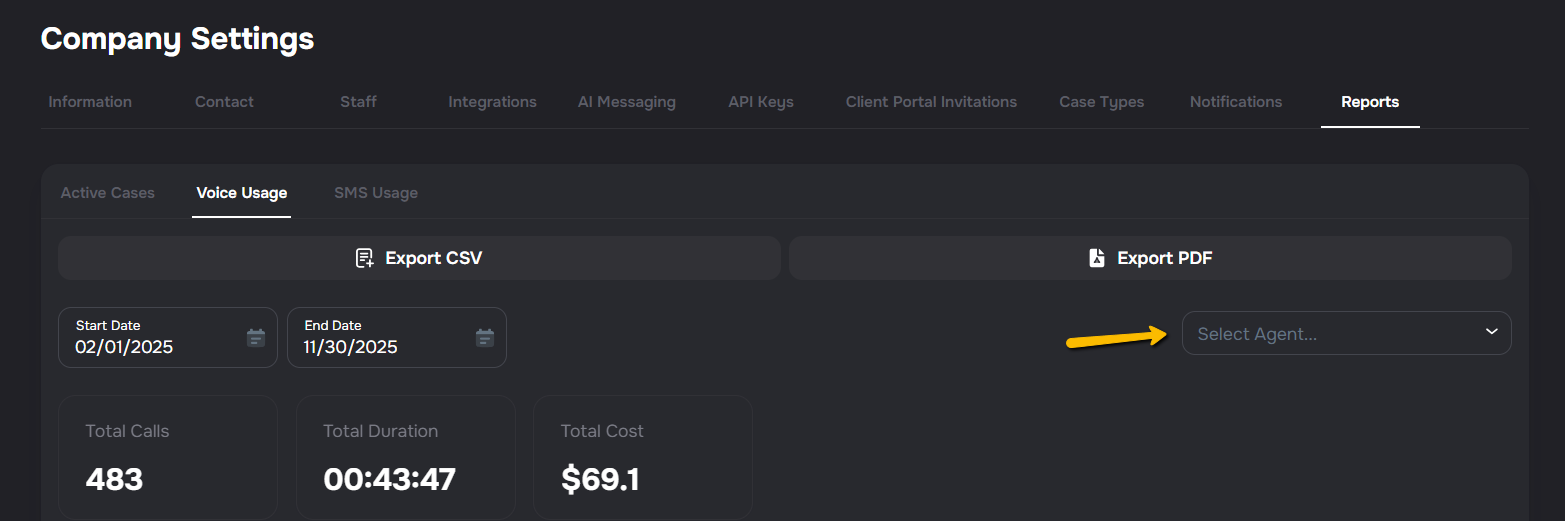
- Choose the month you want to look at.
- Click Apply.
Your list will now show only the reports for that month. 📆✨
Step 4: Open & Review Your Report
Click on any report to open it. Inside, you’ll see:
- Total usage
- Number of calls, messages, or interactions
- Costs (if applicable)
- Any special notes for that month
Everything is organized so it’s easy to read. 👍
Step 5: Download Your Report (Optional)
If you want to save a copy:
- Click the Download button.
- Choose your file type (PDF, CSV, etc.).
- Save it to your computer.
Voice Usage and SMS Usage CSV exports include a Campaign Name column, so you can sort and filter rows by campaign directly in your spreadsheet. 📊
This is great if you need to share it with your team. 💼
🎉 Coming Next Month: Automated Reports!
We’re rolling out automated billing and usage reports next month. This means:
- Reports will be generated automatically
- You’ll get them sent directly to your inbox
- No more manual filtering or searching
You’re going to love how simple it becomes! 🚀
If you have any questions, our support team is always happy to help! 😊