Kayse AI Client Portal: Inviting Your Clients
📈 Level up your client retention with the Kayse client portal!
The Invitation Tab lets your law firm invite clients to access the Kayse client portal. Clients can use either:
- Web browser — log in on any device (desktop, tablet, or phone) at the client portal link — no app download required
- Mobile app — download the Kayse app on phones and tablets (iOS and Android)
With the Kayse client portal, your clients can:
- Stay updated on their case
- Complete tasks you assign them
- Chat with your team easily
This guide shows you how to:
- Send invites to many clients at once
- Create your own welcome message to invite clients
- See how many clients are using the portal 📬
What You’ll See at a Glance
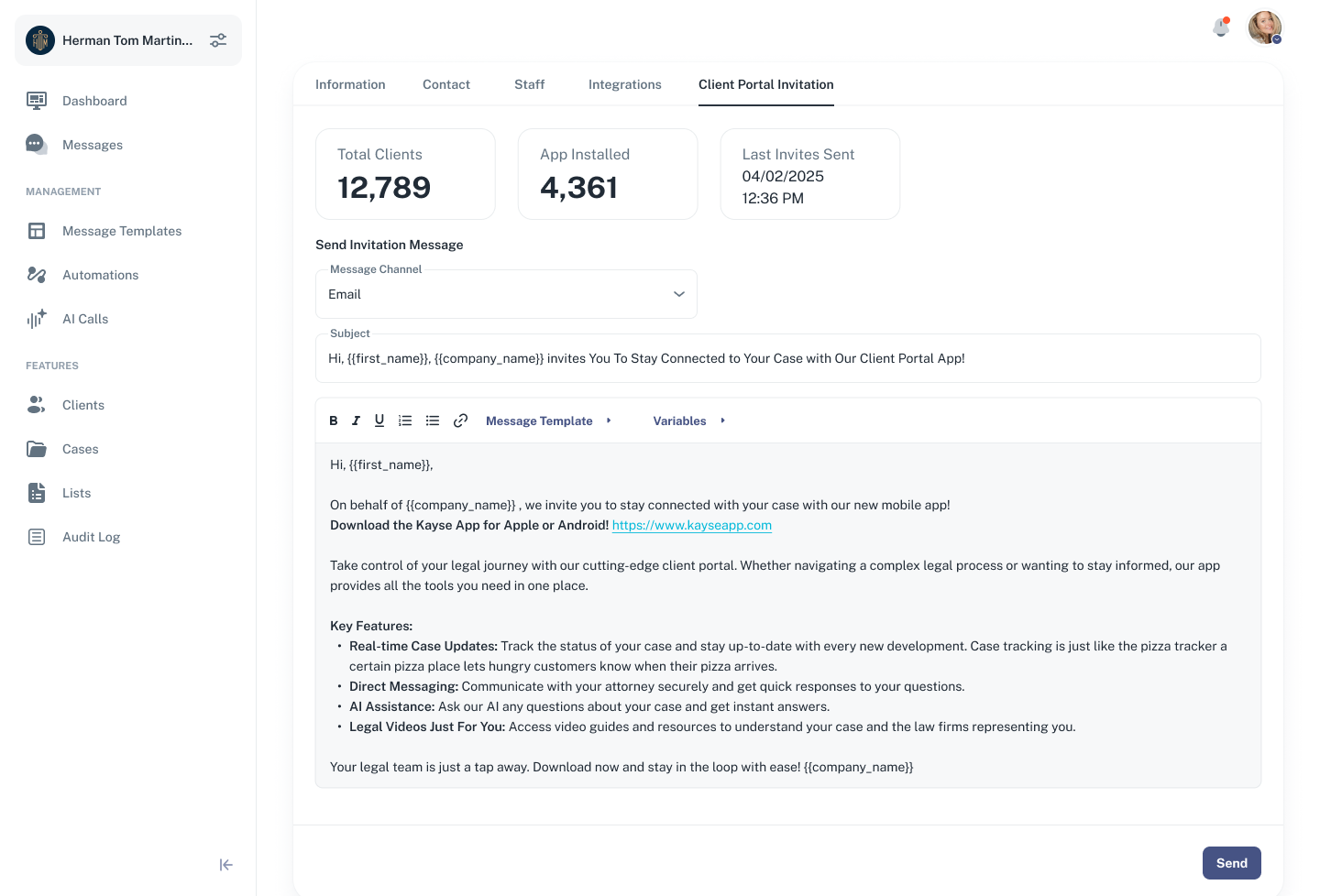
At the top of this tab, you’ll find two key stats:
- Total Clients – The total number of clients added to your Kayse account
- App Installed – The number of those clients who have installed the mobile app
These counters help you measure how many clients have joined the platform and how many are still pending. Note: clients who use the web portal (without app install) are counted when they log in via the invite link.
🧠 Pro Tip: The more clients with portal access (web or app), the smoother your communications and task management will be.
✉️ Sending Invitations
To help clients access the portal, you can send personalized invitations in bulk. Here’s how it works:
Select a Message Channel:
- Choose between Email or SMS depending on how your client prefers to be contacted.
- Based on your choice, the system will send the invite to the client’s email or phone number.
Customize Your Message:
- Kayse pre-fills the message with a friendly default template.
- You can edit the subject and message body 💬
- Add personalization using variables like
or - Alternatively, pick a message from your saved templates 🔁
Click Send 📤
- When you click the Send button, a confirmation window will appear.
- The system shows how many clients will receive the invite (only those who haven’t installed the app yet).
✅ If you previously invited 10,000 clients and 1,000 installed the app, the next send will only go to the remaining 9,000. This prevents the invites from going to people that already installed the Kayse app.
What Happens Next?
Once a client receives the invite:
- They follow the link to either open the web portal or install the Kayse mobile app.
- When they log in for the first time (web or app), Kayse tracks it automatically.
- In your dashboard, their status will update to App Installed when they use the mobile app — no manual updates needed.
This makes it easy to keep track of adoption and re-send to only those who haven’t yet joined.
Why This Matters
Getting your clients onboard with the Kayse client portal improves communication, speeds up task completion, and increases client satisfaction. This tab helps you:
- Reach more clients in fewer clicks
- Personalize communication without extra effort
- Monitor real-time engagement with the portal
Summary
- ✅ Invite all your clients at once via Email or SMS
- 🌐 Clients can use the web portal (no app download) or the mobile app
- ✏️ Personalize the message with variables and templates
- 📈 Track installs automatically in real time
- 🔁 Re-send only to clients who haven’t installed the app yet
Make onboarding smooth, personal, and efficient — all from one powerful tab. 🚀