Outreach: How to Send Blast Omni-Channel Alerts in Kayse via Voice AI, SMS, Email, and In-App Messaging
Blast Alerts are a powerful communication tool for outreach within Kayse that allows you to quickly notify a group of users about critical updates, new case activities, or urgent actions regarding their case. This guide walks you through how to use Kayse for outreach, explains what Blast Alerts are, and shows you how to send them, as well as the value they bring to your CRM/case management workflow.
As a next-generation platform, Kayse empowers seamless omni-channel outreach—featuring Voice AI Agents 🦾🤖 that make calls on your behalf 📞, along with SMS texting 💬, email messaging 📧, and in-app push notifications 🔔.
What Are Blast Alerts?
Blast Alerts are an outreach tool, providing one-time, high-priority notifications that can be sent to a targeted list of case participants. These alerts appear directly within the Kayse interface and are designed to:
- Highlight urgent or time-sensitive case activity
- Encourage fast response and engagement from recipients
- Complement your team's communication workflows without relying on external channels like email
Common use cases include:
- New document requests or uploads
- Changes in case status
- Immediate next steps required by a client
- Follow-up prompts when response deadlines are missed
Outreach: How to Send a Blast Alert
Here’s a step-by-step walkthrough for sending a Blast Alert in Kayse:
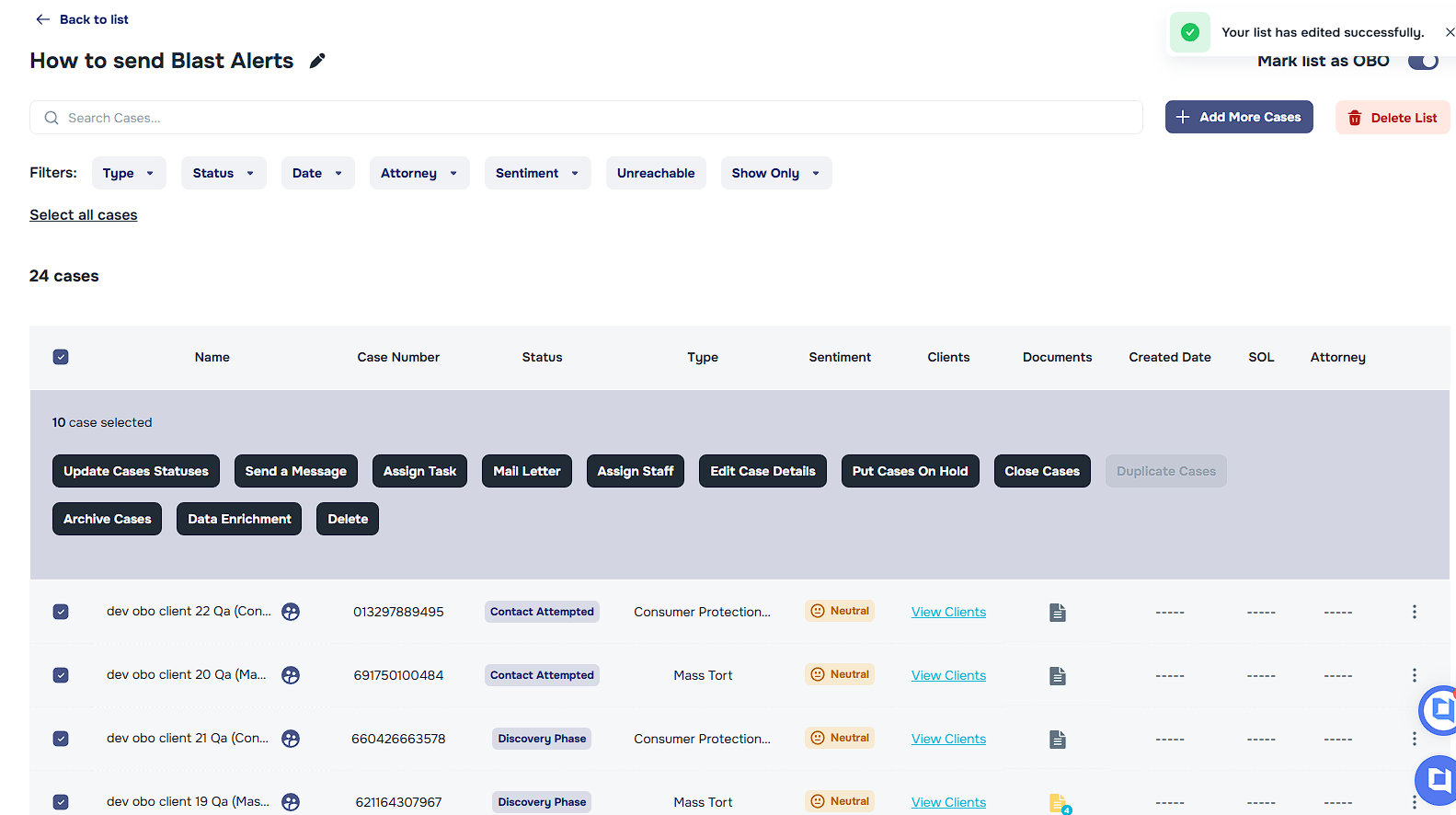
Open the Kayse Workspace Navigate to the Lists tab and select the specific list where you want to send alerts.
Select Specific Users or the Entire List
At the top-left of the list, click "Select all cases", or simply select the specific individuals you would like to notify. Then click the button labeled "Send a Message".
Compose Your Message In the Blast Alert editor, you’ll be prompted to:
Select a Message Type (if Email is selected, you will be prompted to add a subject line).
Write a Message Body (e.g., “Please upload your bank statements by 5PM tomorrow.”)
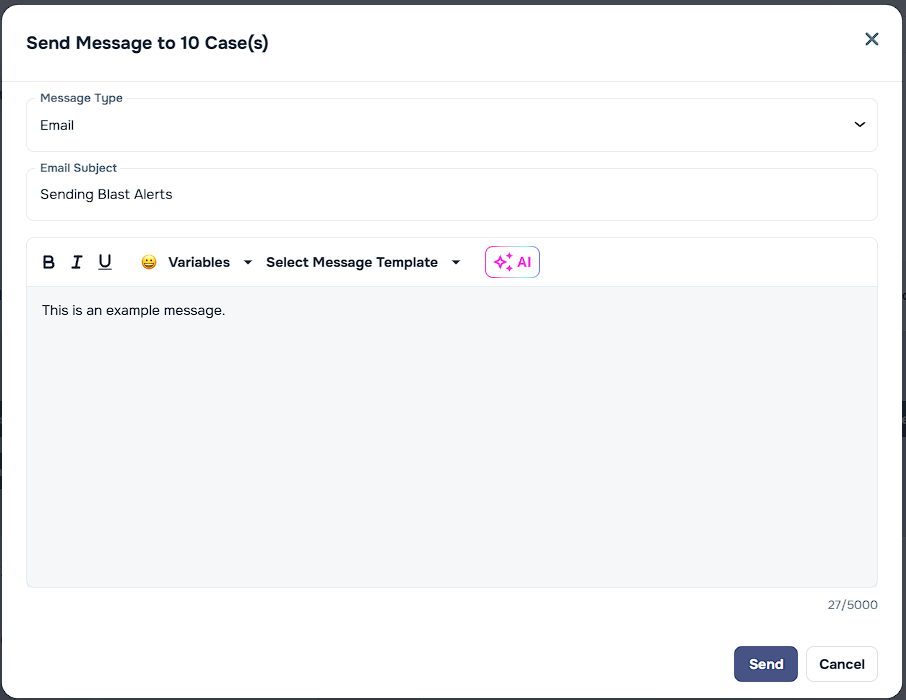
Send the Alert Review your message and click "Send". The alert will appear in the recipient’s Kayse dashboard with a badge indicator.
Benefits of Using Blast Alerts
Blast Alerts help you streamline communication and drive faster case resolution. Here’s how:
- Increased Visibility: Alerts bypass passive channels like email and appear directly in Kayse.
- Faster Response Times: Clear, time-sensitive prompts increase user action and reduce delays.
- Personalized Messaging: You control the tone and content, ensuring relevance and clarity.
- Reduced Churn: By keeping clients informed and engaged, alerts help prevent cases from stalling.
🧠 Best Practices
- Be clear and direct: Use actionable language that tells the recipient exactly what to do.
- Avoid repetition: Only send alerts when necessary to avoid desensitizing recipients.
🙋 Need Help?
To learn more about triggering AI Call Campaigns with Voice AI Agents, review this article.
Have questions about setting up or optimizing your Blast Alerts?
We’re here for you! If you have questions about how to use this feature or need help setting it up, contact our support team.