

AI Agent Builder, Conditional Logic & Smart Tasks, AI Campaign Improvements
This release focuses on making your day-to-day work faster, simpler, and more reliable — especially when building AI Voice Agents, guiding clients through structured tasks (with conditional logic), improving AI campaign setup and execution, and more.
🤖 AI Agent Builder (Beta) — Build, Test & Improve Voice AI Agents
We’re introducing AI Agent Builder (Beta) — a new, easy way to create and manage Voice AI agents directly inside Kayse, without any technical setup or external tools.
This feature is designed to help law firms build smarter AI agents faster, test them safely, and confidently use them in real client campaigns.
📂 One place to manage all your agents
A new Voice Agents section is now available in the left sidebar.
From here, you can:
- See all AI agents created in your company
- View each agent’s voice, language, and status (Draft or Published)
- Search, edit, or delete agents
- Create a new agent by clicking New
This gives your team a clear overview and full control in one place. 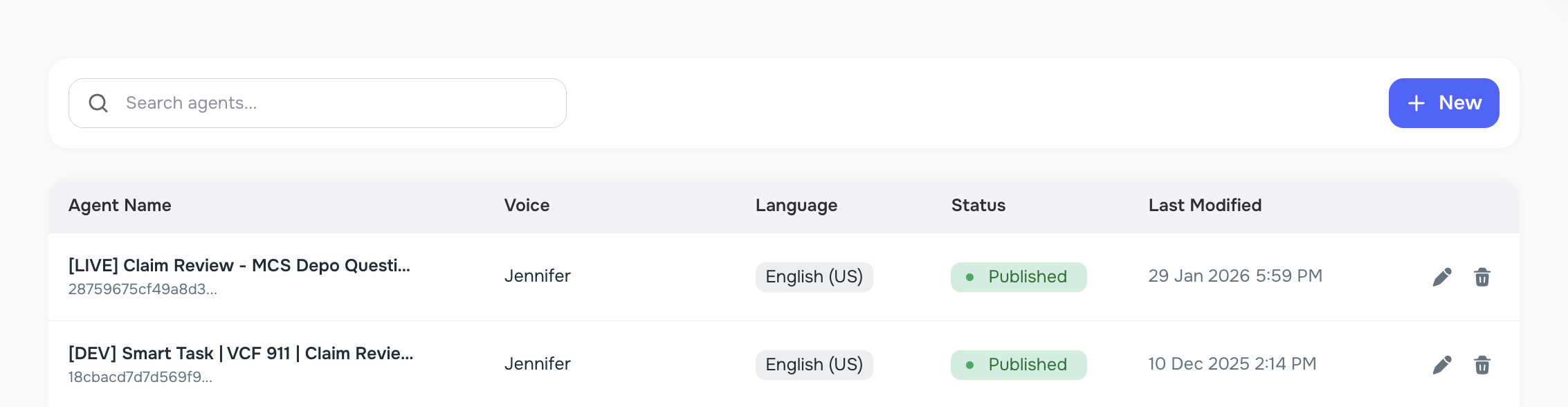
🛠 Step 1 — Set up your AI Agent
When creating a new agent, you’ll walk through a simple setup flow:
1️⃣ Agent name Give your agent a clear name (many firms use Case Type + Goal, e.g. “Intake Follow-Up”).
2️⃣ Voice & language Choose how your agent will sound and which language it will speak.
3️⃣ Welcome messages (Inbound & Outbound) You can define different greetings depending on how the call starts:
- Inbound — when a client calls you
- Outbound — when your firm calls the client
You can also insert dynamic details (client name, case info, company name), so the agent speaks more naturally and personally.
4️⃣ Agent behavior (Prompt) You can guide how the agent should talk and behave during the call — what questions to ask, how to respond, and what the goal of the conversation is. 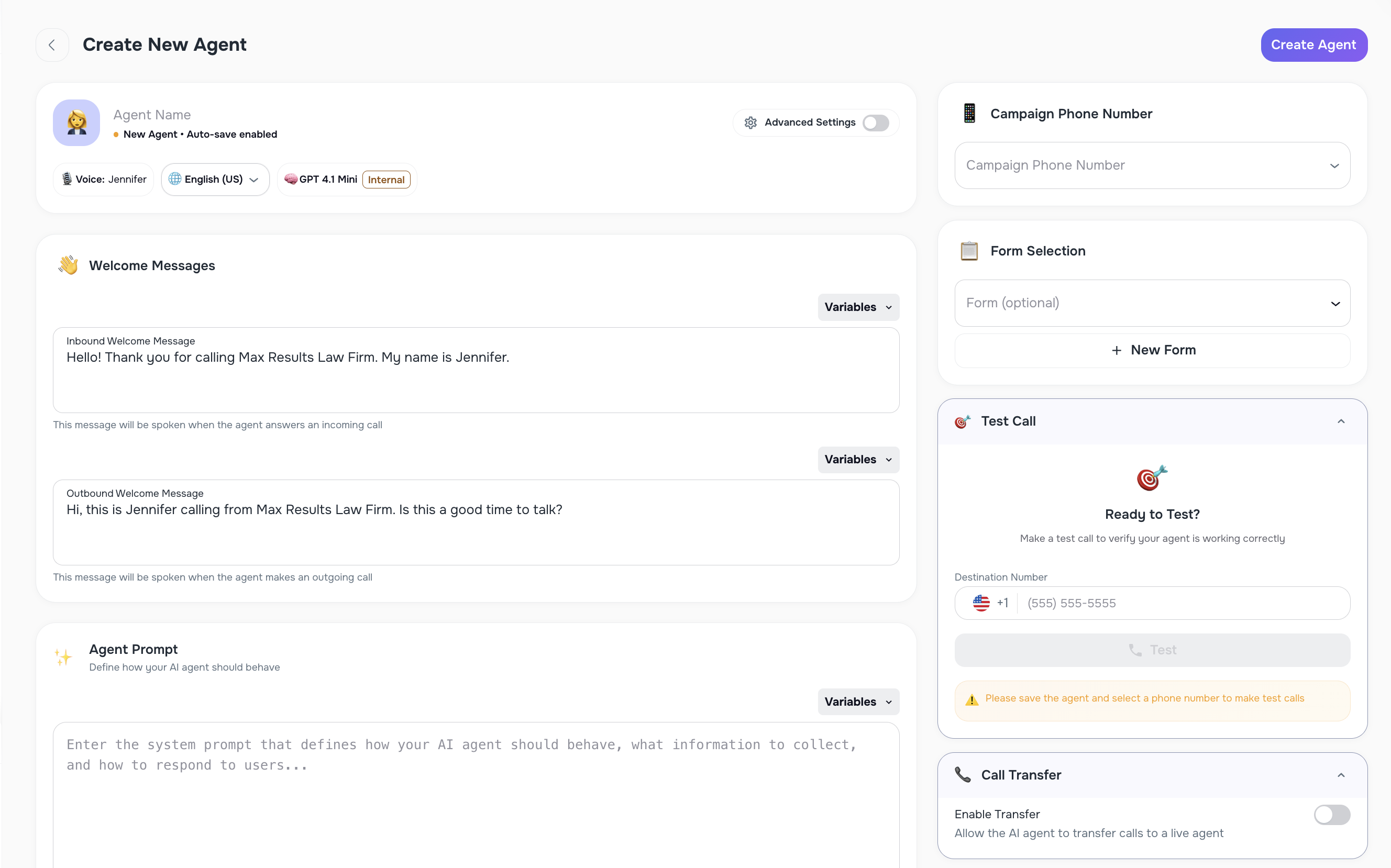
📋 Use Forms to guide the conversation (Optional)
If you attach a Form to the agent:
- The agent will ask questions step by step
- Questions follow the same order shown in the form
- This is perfect for structured intakes or information collection
If the form is updated later, the agent can be updated easily as well.
🔁 Call Transfer to a live person (Optional)
If needed, you can enable Call Transfer, allowing the AI agent to hand the call off to a real team member.
There are two transfer options:
- Cold Transfer — immediate transfer
- Warm Transfer — the agent speaks briefly first, then transfers the call
This is useful when a call needs human follow-up or approval.
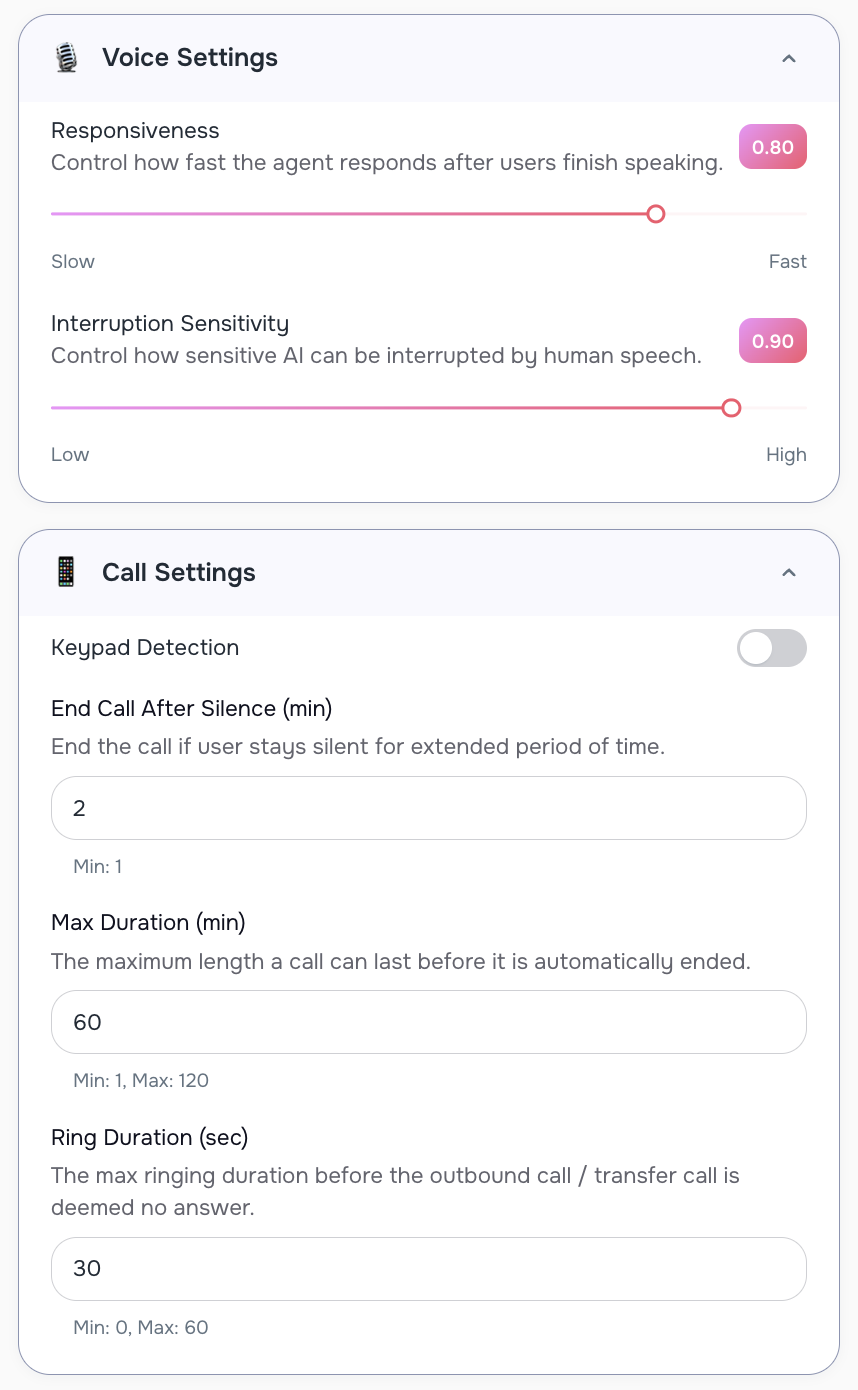
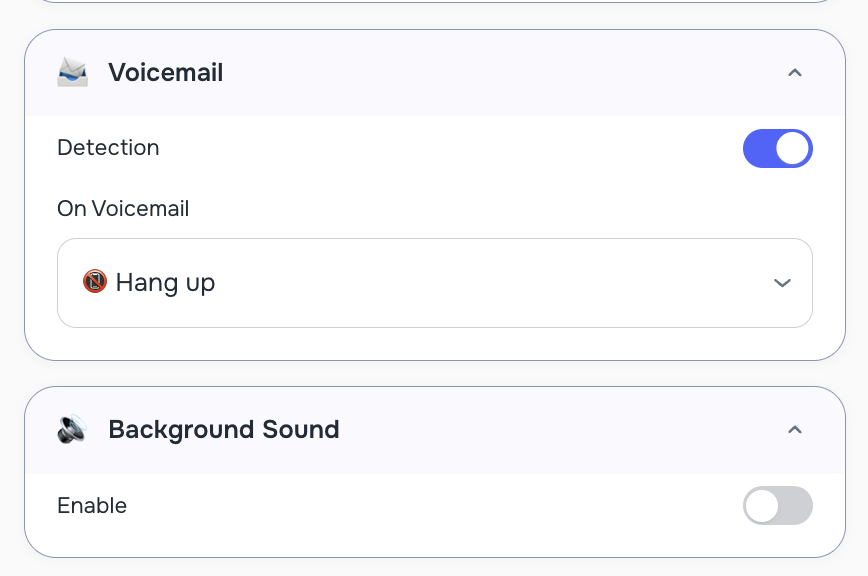
⚙️ Advanced call controls (optional)
For more control, you can fine-tune how calls behave:
- How fast the agent responds
- How easily it can be interrupted
- Maximum call length
- Auto-end if the caller stays silent
- Voicemail detection (hang up or leave a message)
- Optional background sound (office, call center, etc.)
🧪 Step 2 — Test before using it live
Before using an agent in real campaigns, you can test it safely:
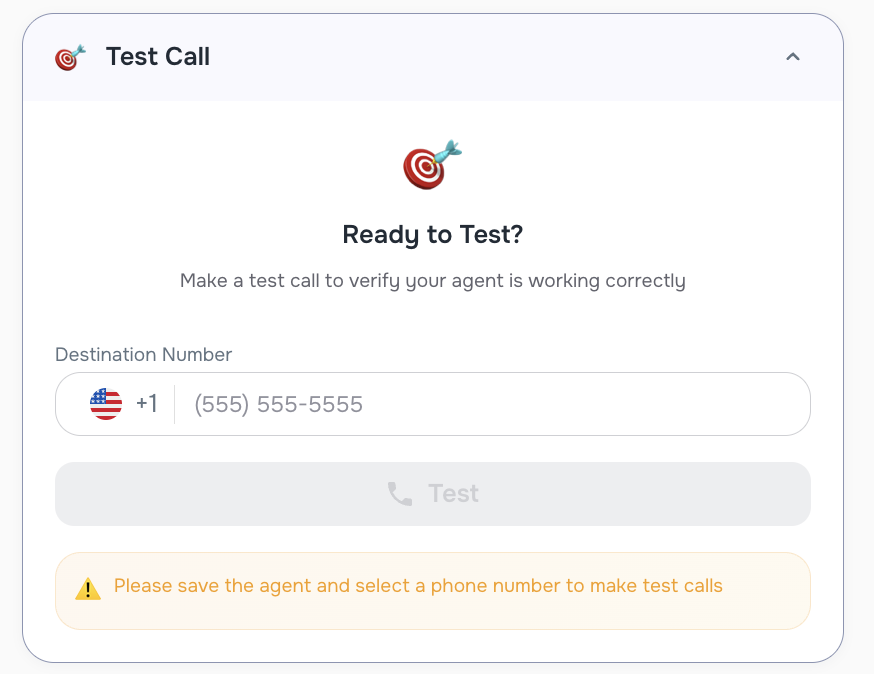
- Enter your phone number
- Click Test
- Receive a real test call and hear how the agent behaves
Once everything looks good:
- Click Save & Publish
- The agent becomes available for AI Campaigns
🔄 Easy updates after testing
If you need to change something later (for example, update form questions):
- Edit the form
- Re-open the agent
- Select the updated form
- Test again and re-publish
No need to start from scratch.
🚧 Beta status & what’s coming next
AI Agent Builder is currently in Beta and actively improving. Upcoming enhancements include:
- 📩 Sending SMS during calls
- 📧 Sending Emails during calls
- 💬 A ChatBox helper to make agent setup even easier
- ⚡ Creating agents directly inside AI Campaign setup
- 📅 Appointment booking capabilities
🧩 Smart Tasks Improvements — Conditional Logic & Required Tasks
We’ve introduced smarter, more flexible Smart Tasks that adapt to each client’s answers — so your workflows feel more natural and require less manual follow-up.
🔀 Conditional Logic for Smart Tasks
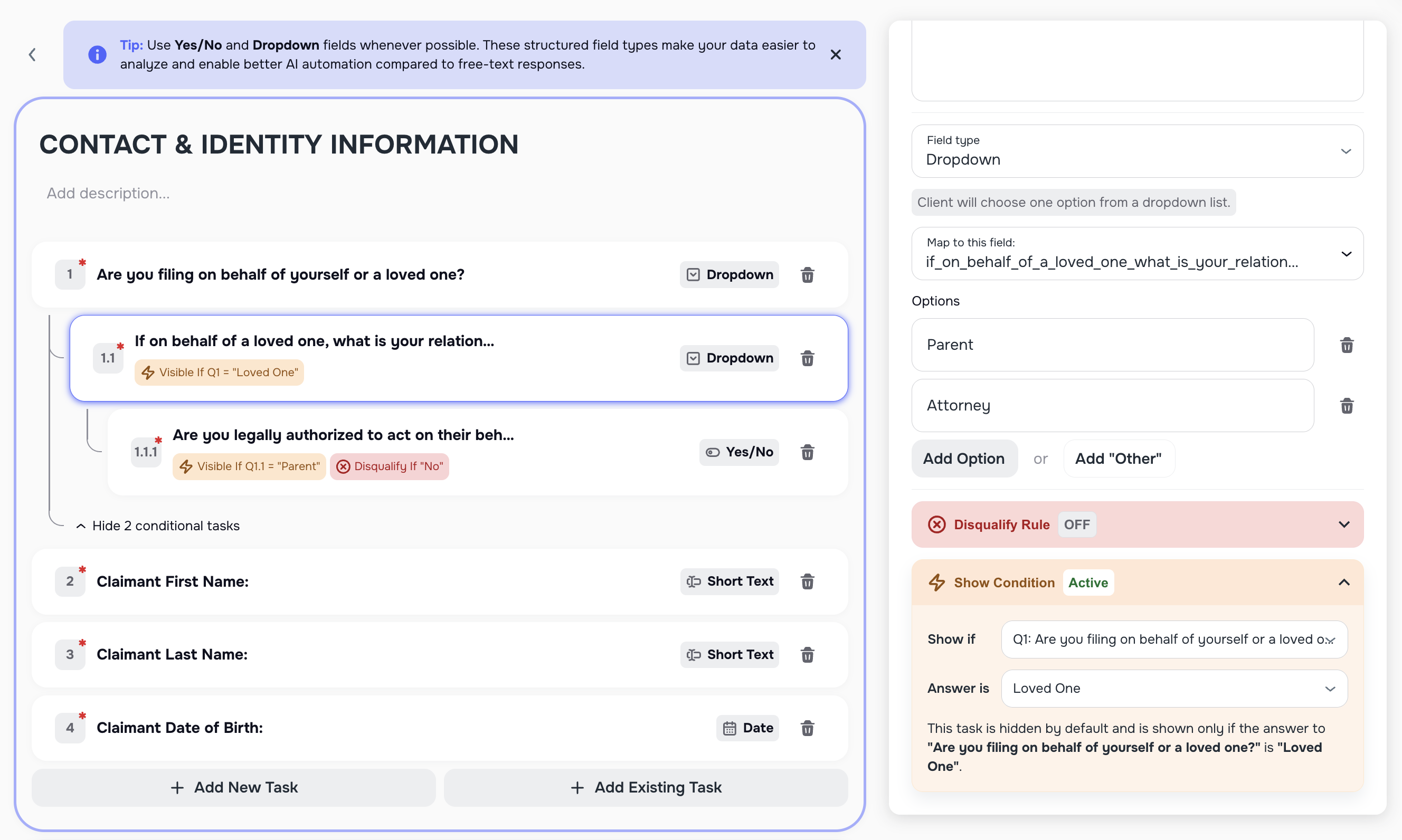
You can now connect tasks together using conditional (if/else) logic.
This means:
- Follow-up tasks can appear only when they’re relevant
- Clients see fewer unnecessary questions
- Task flows feel more conversational and intuitive
Conditional logic is supported for common task types, including:
- Yes / No
- Dropdown
- Single Select
- Multi Select
For example: If a client selects a specific answer, additional related tasks can automatically appear. If not — those tasks stay hidden.
This logic works seamlessly when clients complete tasks via:
- 🔐 Secure Links
- 📱 Mobile App
🚦 Smarter Flow Control (Disqualify Logic)
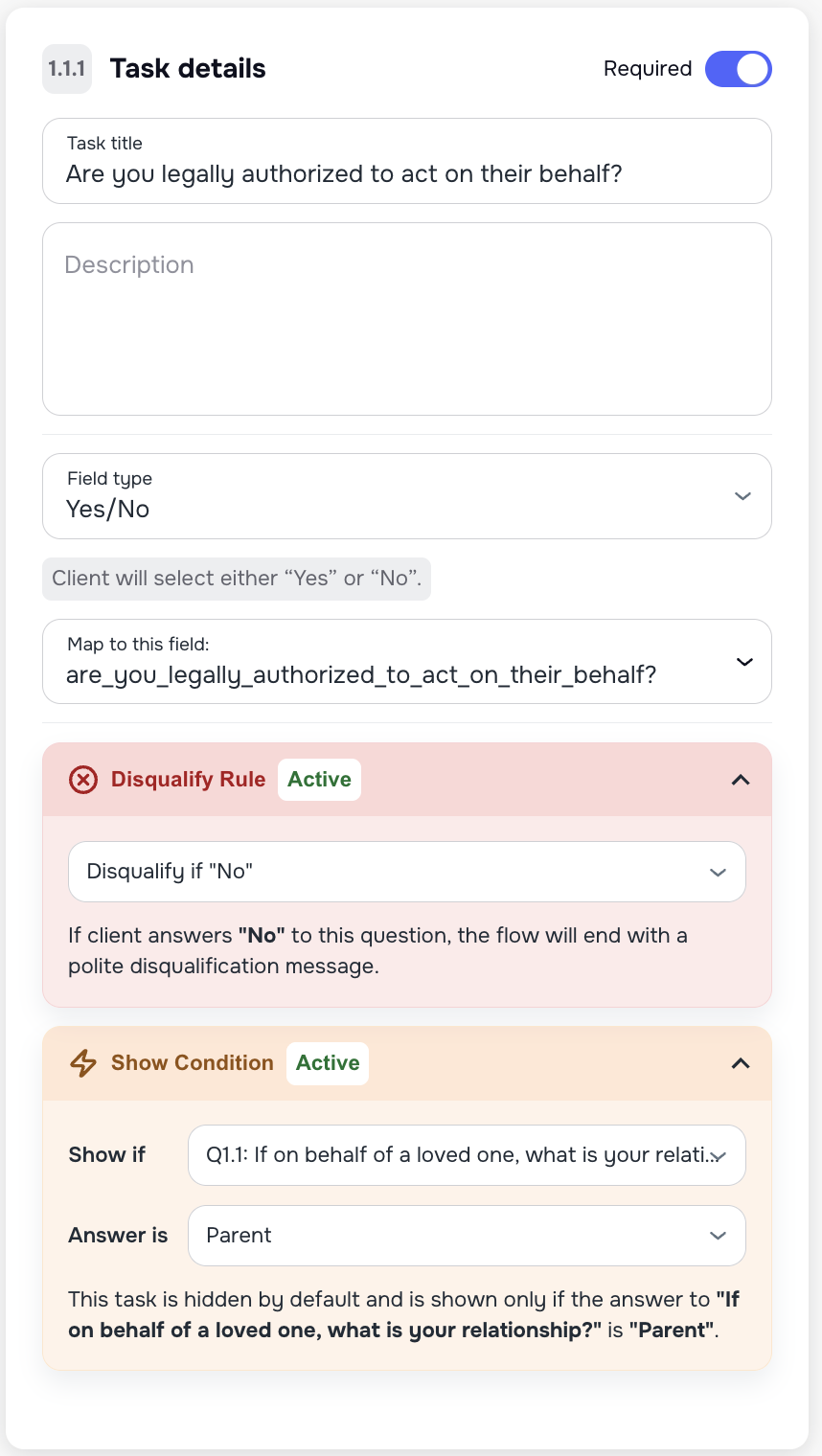
Smart Tasks can now include disqualify logic, allowing workflows to end early when appropriate.
For example:
- If a client provides an answer that doesn’t meet your criteria, the task flow can automatically stop
- No extra steps, no confusion for the client
✅ Required vs Optional Tasks
You can now mark tasks as Required or Optional.
- By default, all tasks are Required
- Optional tasks are not mandatory for a client to be considered Converted in AI Campaigns
- This gives you more control over what truly matters for conversion, without blocking progress on secondary questions
What’s next?
This is just the beginning. We’ll continue improving Smart Tasks with:
- More advanced conditional operators (such as AND / OR)
- Even greater flexibility for complex real-world workflows
🚀 AI Campaigns — More Control, Better Visibility & Safer Setup
This release brings several important improvements to AI Campaigns, giving your team more control over access, call pacing, scheduling, and visibility — while helping prevent common setup mistakes.
🔐 Share AI Campaigns with Limited Access (Public Campaign Links)
You can now share AI Campaign data with your team — without requiring them to log in.
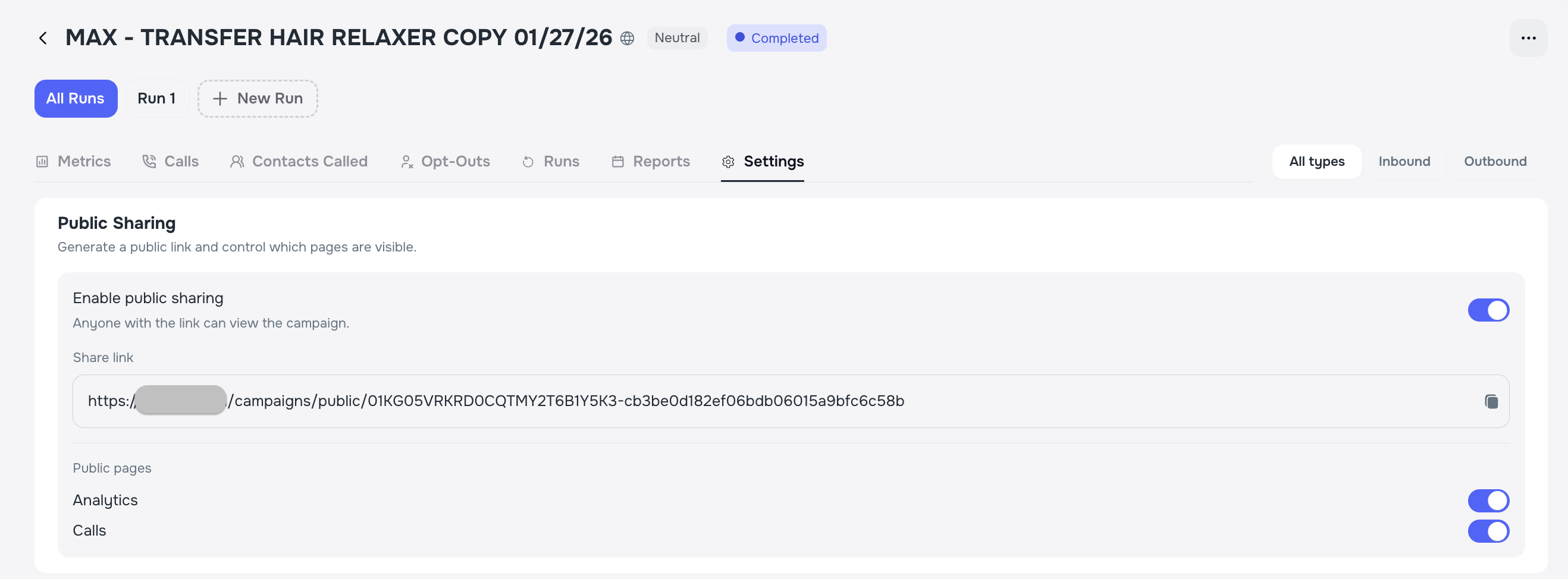
On the Campaign Review & Settings page, you can generate a public campaign link and decide exactly what others can see. This is especially useful when working with call centers, supervisors, or external partners.
With public access, you can choose to share:
- 📊 Campaign analytics
- 📞 Call activity and results
This allows stakeholders to stay informed while keeping the rest of your system private and secure.
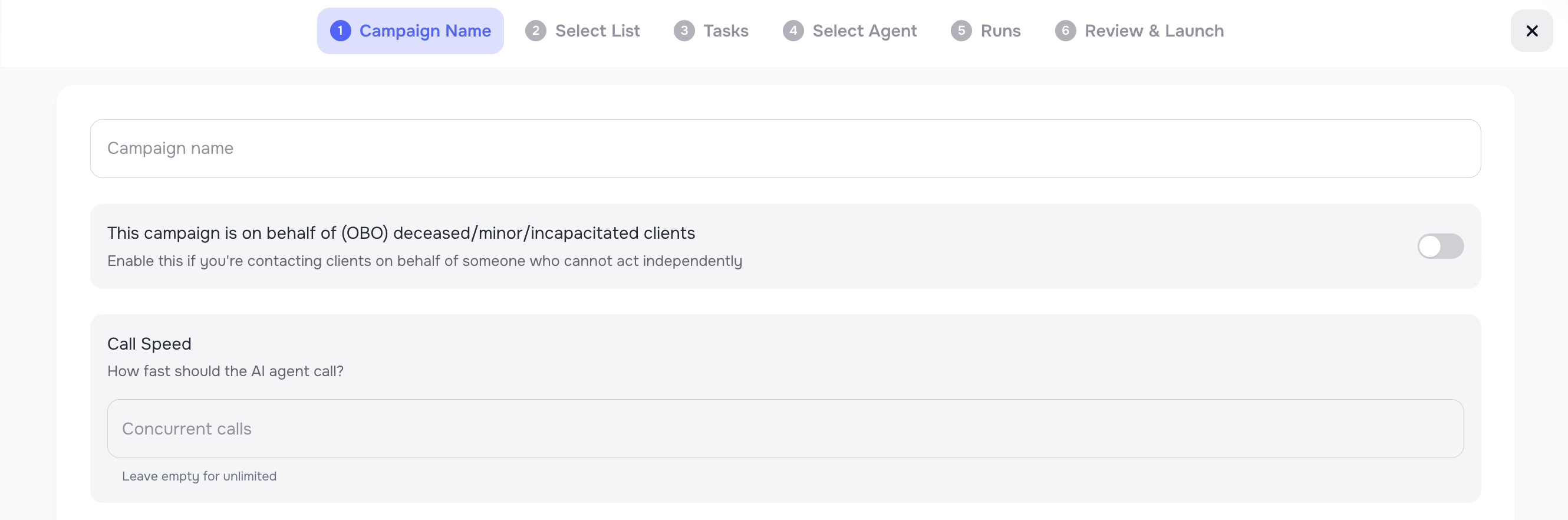
🐢 Control Call Speed for Individual Campaigns
For transfer campaigns, calling too fast can overwhelm live agents. Now, you can slow down call rates on a per-campaign basis.
This lets you:
- Match AI call pacing to your available staff
- Prevent too many transfers at once
- Keep campaigns running smoothly without stopping or splitting lists
Perfect for campaigns that rely on human handoffs.
⏰ Smarter Callback Scheduling (Time Window Warnings)
We added a warning when callbacks are scheduled outside your allowed call time window.
If a callback would happen after calling hours:
- You’ll see a clear warning
- You can adjust settings before launching the campaign
This helps avoid confusion and ensures calls only happen when they’re allowed. 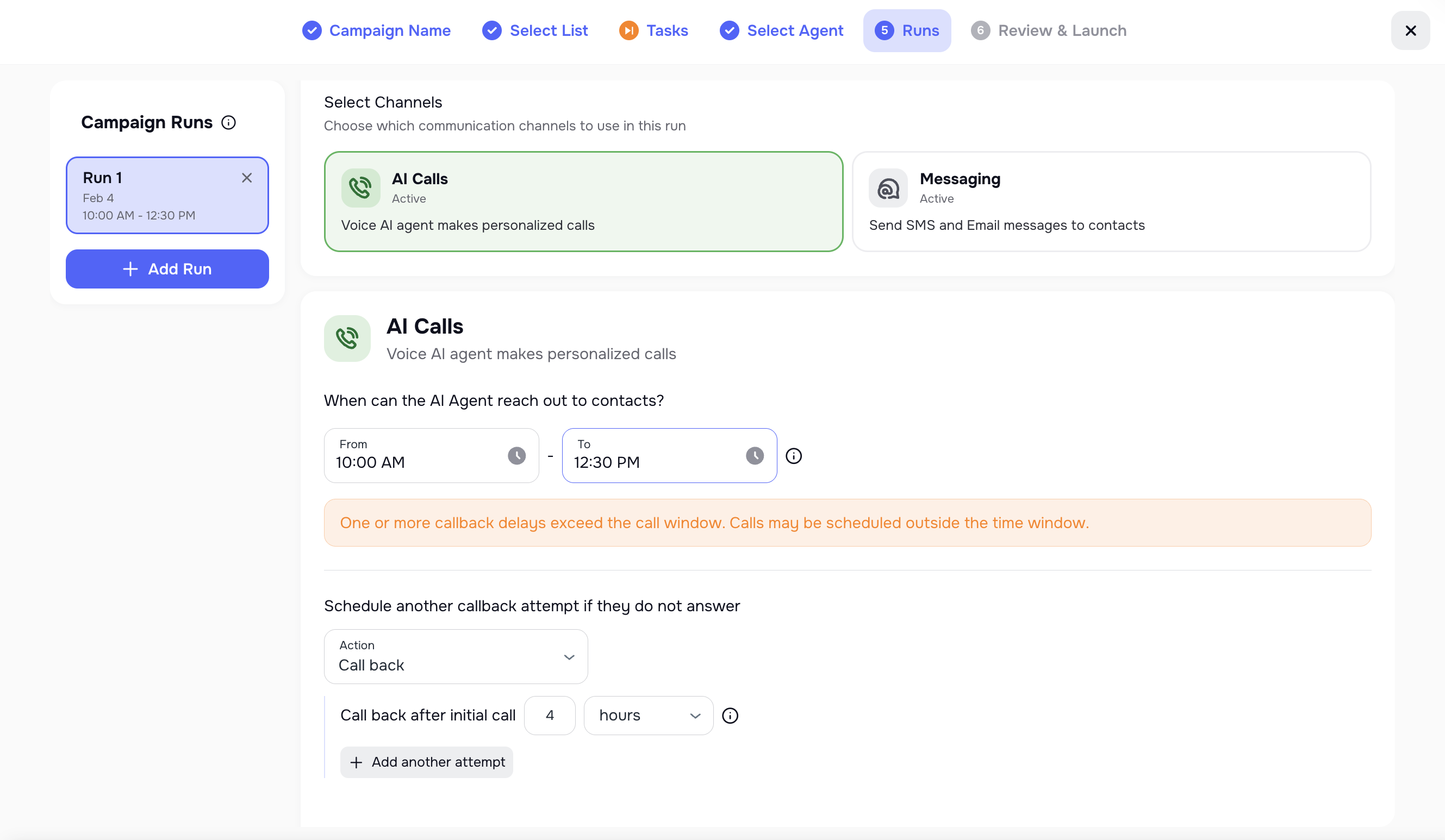
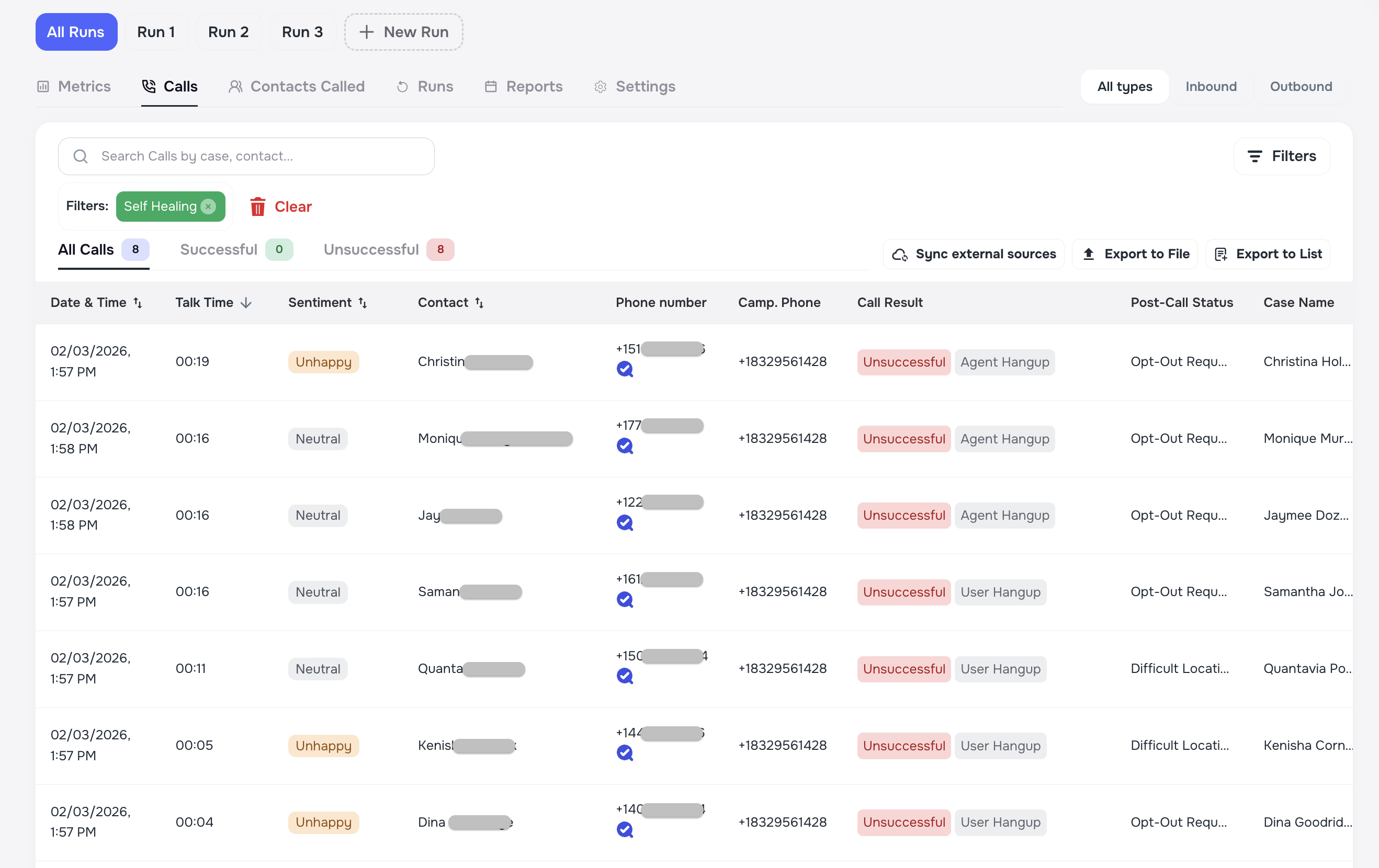
🔍 Better Visibility for Self-Healed Contacts
It’s now easier to see when Kayse automatically fixes bad phone numbers during a campaign.
On the Calls page, you can filter by Self-Healed Contacts to:
- View only calls where a phone number was corrected
- Understand where data enrichment occurred
- Review campaign performance more clearly
This makes enrichment results visible right where you need them.
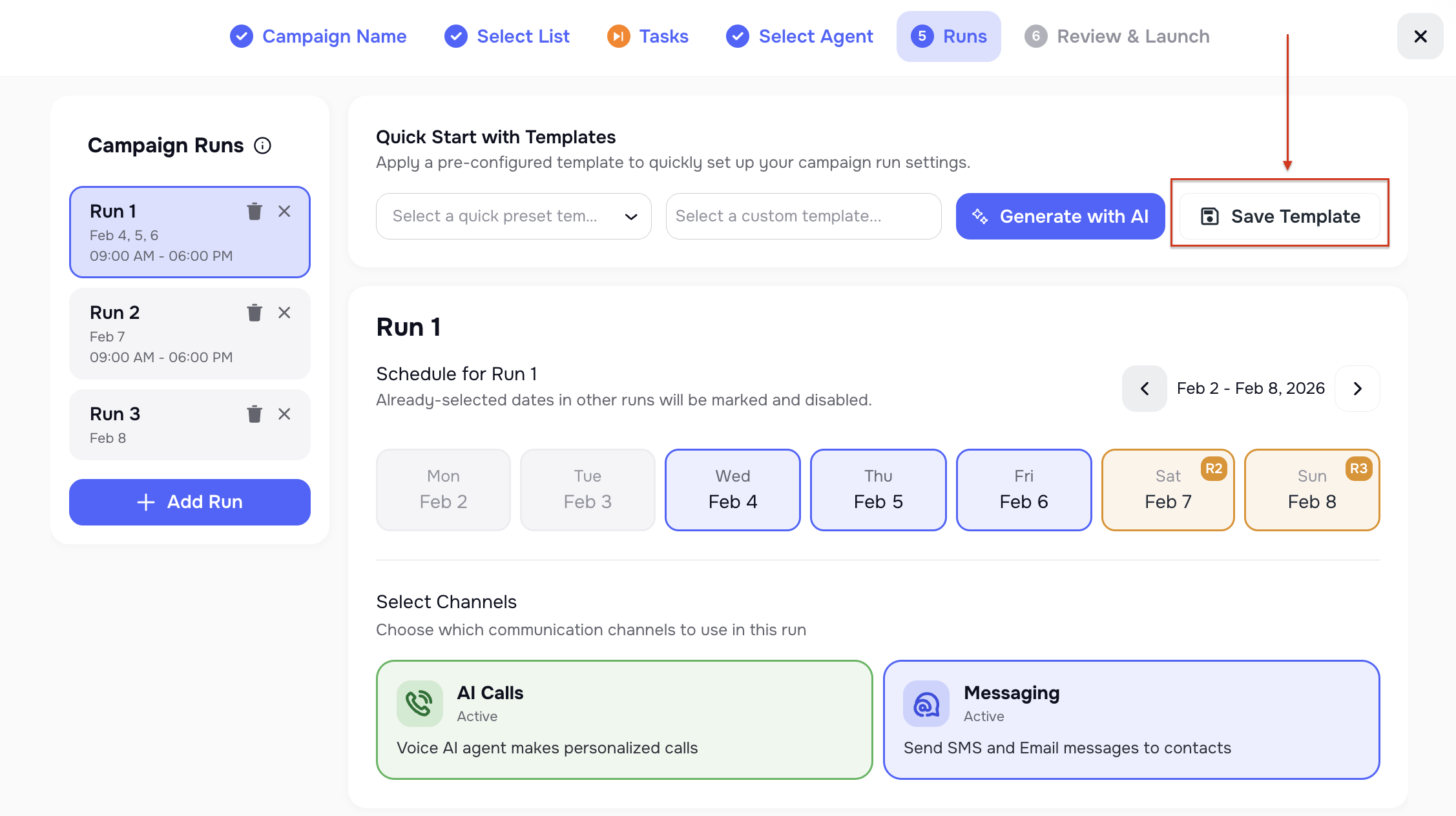
💾 Save Campaign Runs as Templates (Manual & AI-Generated)
You can now save your campaign run setup as a reusable template.
If you’ve configured a campaign with specific schedules, messages, and settings:
- Click Save as Template
- Reuse it later in seconds instead of rebuilding everything
You can also generate templates with AI — just fill out a few fields, and Kayse handles the rest. A big time-saver for teams running similar campaigns regularly.
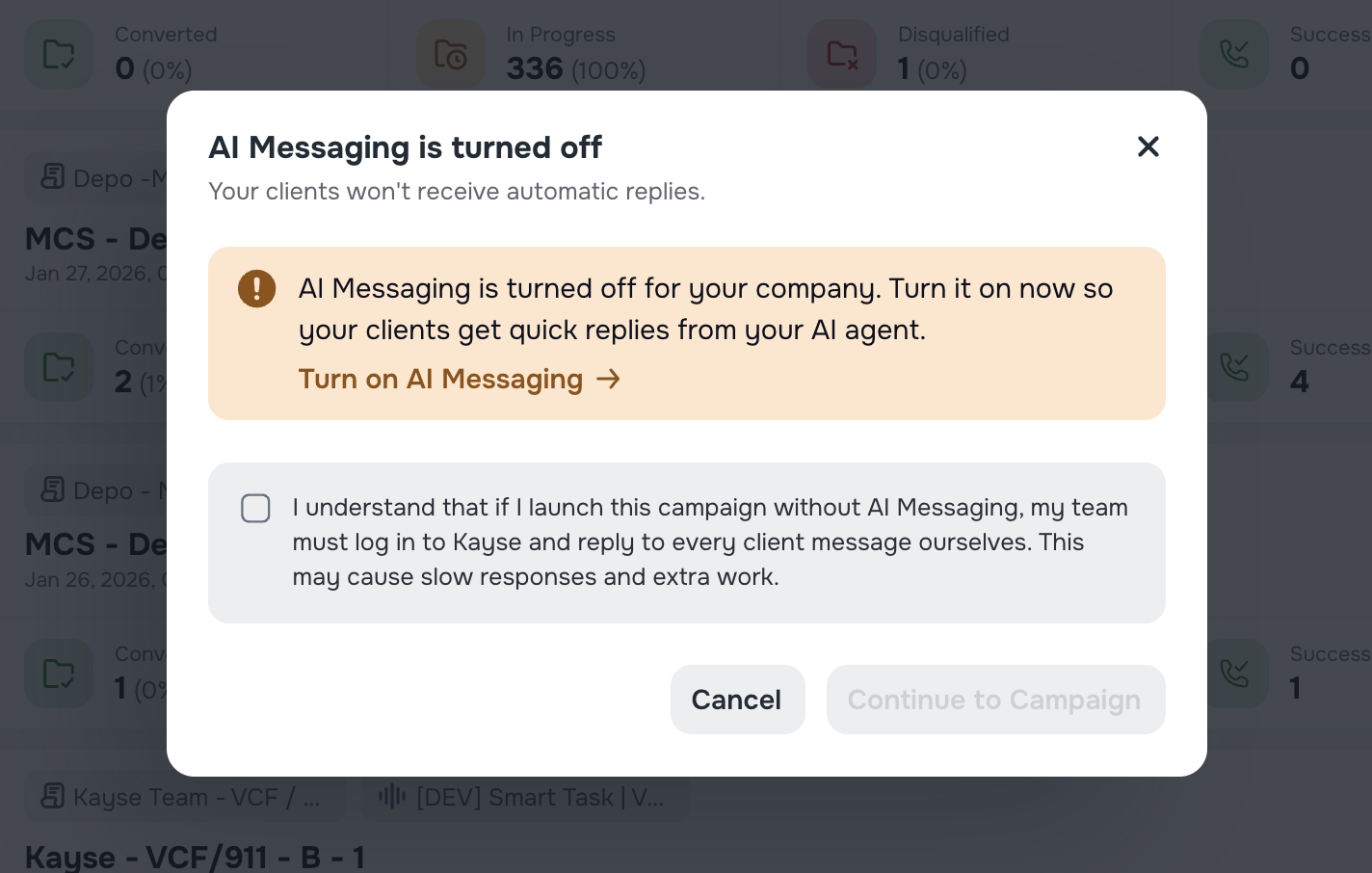
⚠️ Warning When AI Messaging Is Turned Off
To prevent missed messages, we added a confirmation warning when creating a campaign while AI Messaging is disabled.
If AI Messaging is off:
- You’ll see a reminder explaining what this means
- You can quickly jump to Company Settings to enable it
- Or confirm that you want to proceed without AI handling replies
This helps avoid slow responses and unexpected manual work for your team.
🤖 AI Receptionist — Faster Call Review & Easier Follow-Ups
We’ve added a couple of small but very practical improvements to the AI Receptionist page to help teams work with inbound calls more efficiently.
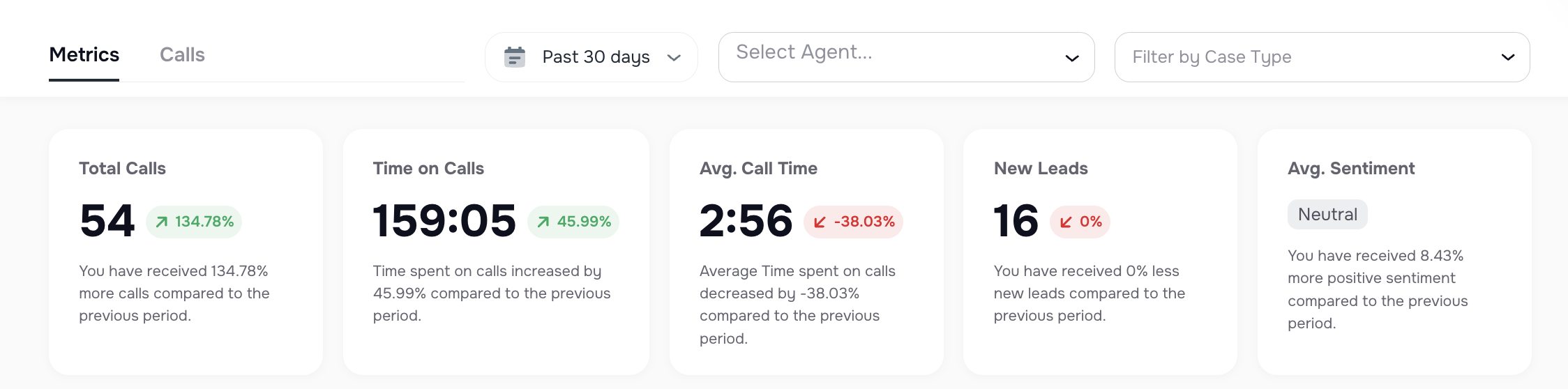
🏷️ Filter Inbound Calls by Case Type
You can now filter inbound calls by Case Type directly on the AI Receptionist page.
This makes it much easier to:
- Focus on specific types of cases
- Quickly review only the calls that matter to your workflow
- Reduce noise when handling a high volume of inbound calls
Especially helpful for firms handling multiple case types at the same time.
💬 Go to Messages — One Click from Call to Chat
When reviewing an inbound call, you’ll now see a “Go to Messages” button.
With one click, you can:
- Jump straight from the call record to the message thread with that client
- Continue the conversation without searching or switching screens
- Respond faster and keep context in one place
A simple change that saves time and keeps communication smooth.

💬 AI Messaging Agent — Smarter, Safer & More Respectful Conversations
In this release, we’ve made several important improvements to how the AI Messaging Agent communicates with clients. The goal is simple: respond only when appropriate, respect client intent, and avoid unnecessary or confusing messages.
🔗 No More Unrequested Task or Form Links
The AI Messaging Agent will now send task or form links only when a client explicitly asks for them.
This means:
- No surprise links in conversations
- No links sent after tasks or forms are removed
- Cleaner, more focused replies
Clients only receive links when they clearly request them.
📄 Case Status Is Shared Only When Asked
Previously, the agent could include case status details even when the client didn’t ask. Now, the AI Messaging Agent will:
- Share case status only if the client explicitly requests it
- Keep responses short and limited to essential information
- Avoid exposing extra case details by default
This reduces confusion and prevents unnecessary disclosure.
⏰ Additional Safety for Messaging with Allowed Days/Times & Client Time Zones
The AI Messaging Agent now has an extra level of safety to restrict outreach to configured working hours and client time zones. What’s improved:
- Replies are only sent during allowed calling/messaging hours
- Off-hours messages are held until the next allowed day/time
- Early-morning or late-night messages are avoided
Clients receive messages only when they’re expected and appropriate.
📞 AI Can Schedule Campaign Callbacks via Messaging
If a client asks for a callback during a conversation, the AI Messaging Agent can now handle it end-to-end.
Here’s how it works:
- The client requests a callback at a specific time
- AI understands the request and checks active campaigns
- The callback is scheduled in the client’s time zone
- The AI Campaign places the call at the right time
This creates a smooth experience without manual follow-ups.
📊 Dashboard Improvements — Better Visibility & Faster Action
We’ve introduced several Dashboard enhancements to help teams focus on what matters most and respond faster.
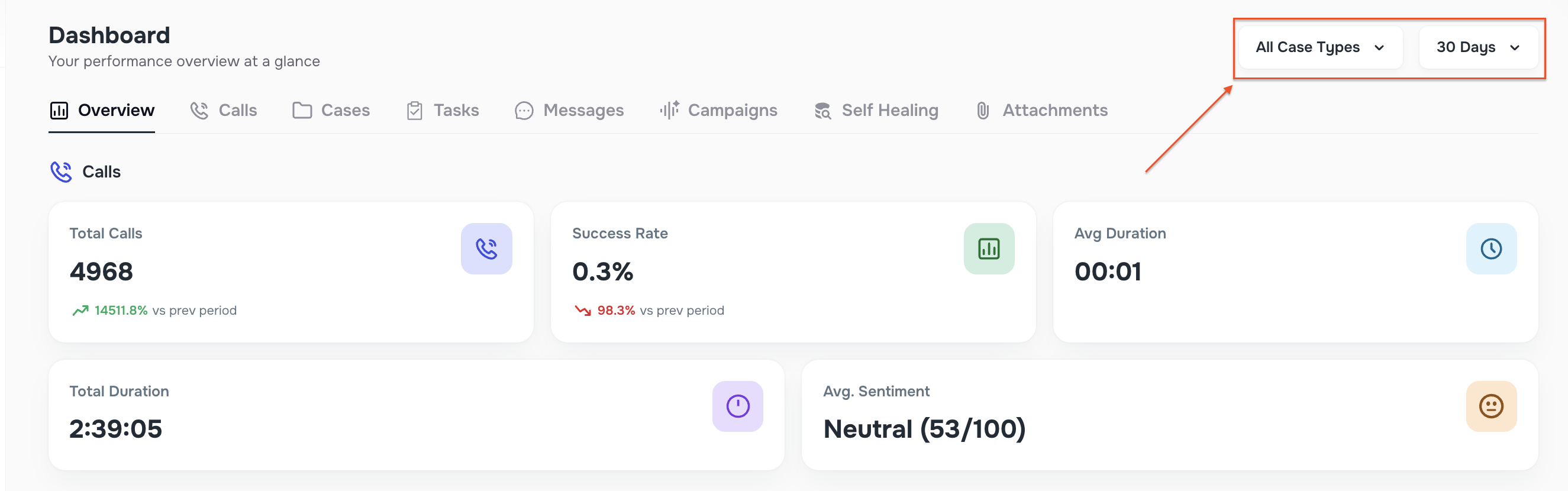
🗂 Case Type Filtering Across the Dashboard
You can now filter Dashboard data by Case Type:
- available on the main Dashboard,
- applied consistently across all tabs (Overview, Calls, Cases, Tasks, Messages, Campaigns),
- makes it easier to analyze performance and activity by specific case types.
This is especially useful for firms managing multiple practice areas or campaign types at once.
🤝 Hand-Off & Appointment Requests in Messages
The Dashboard → Messages view now includes dedicated sections for:
- Human Hand-Off requests — conversations where clients ask to speak with a live person,
- Appointment booking requests — conversations related to scheduling or booking.
These requests are surfaced directly on the Dashboard, so your team can quickly identify conversations that need immediate human attention — without digging through individual chats. 🚀
📱 Client App Document Viewing & Notifications
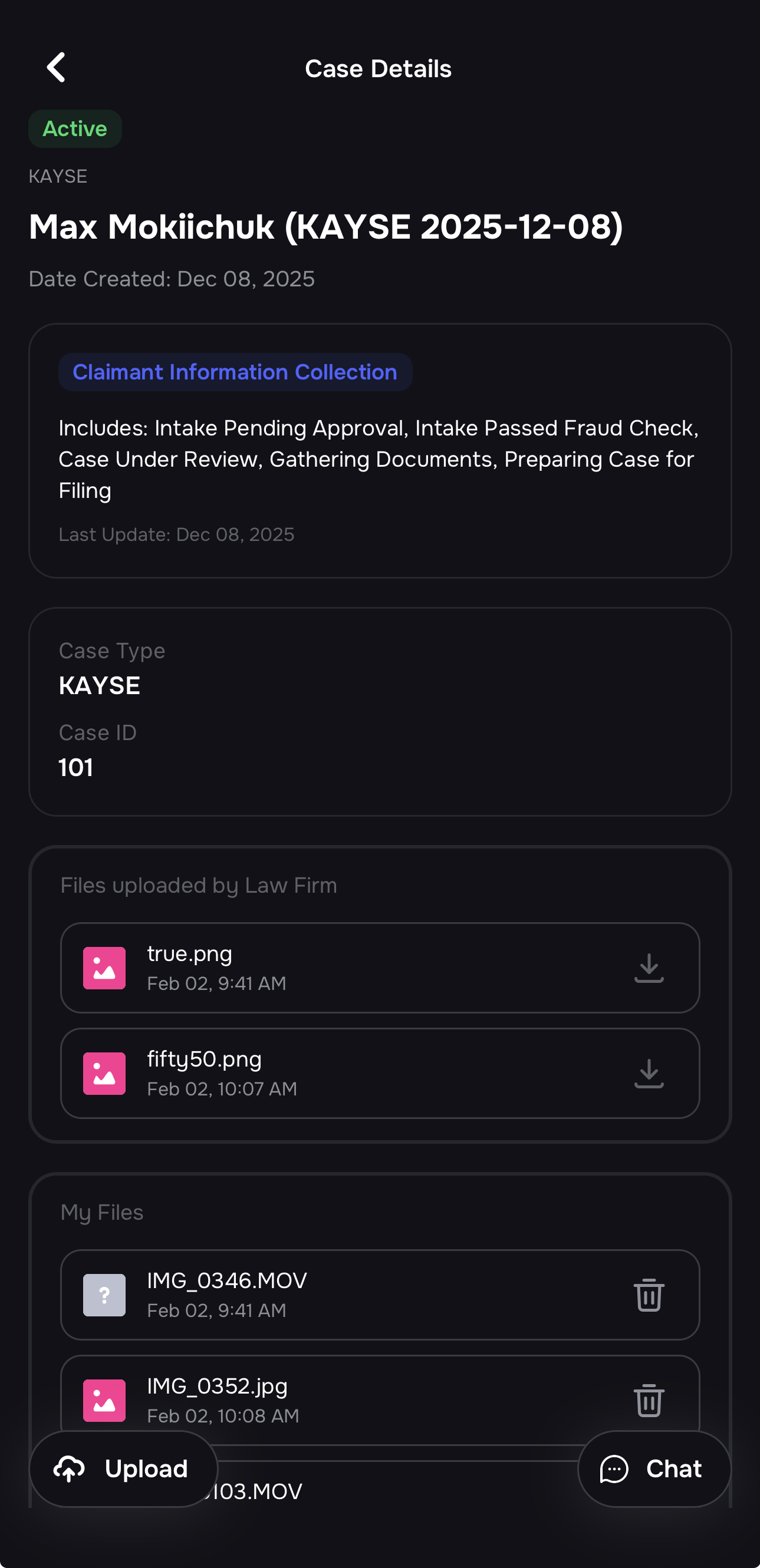
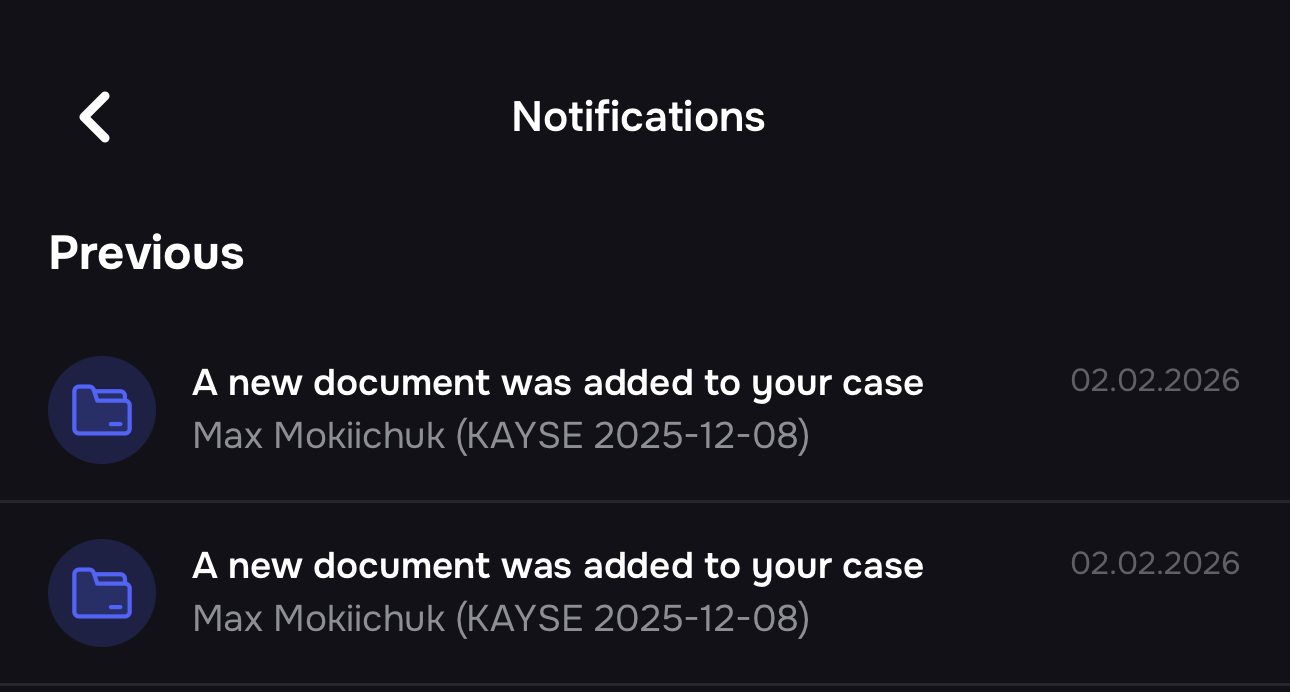
We introduced a major improvement to how firms share documents with their clients via the Kayse mobile app.
- Firms can now upload documents directly to a Case from the web app.
- If a client does not have the mobile app installed, they receive an email notification letting them know a new document is available, with a clear call-to-action to download the app.
- If a client already has the app installed, they receive a push notification instead.
- Inside the mobile app, clients can securely view and download documents, and upload signed files back to the firm when needed.
This creates a secure, app-first document flow while keeping clients informed at every step. 🔐📄
💬 Message Templates Across All Messenger Channels
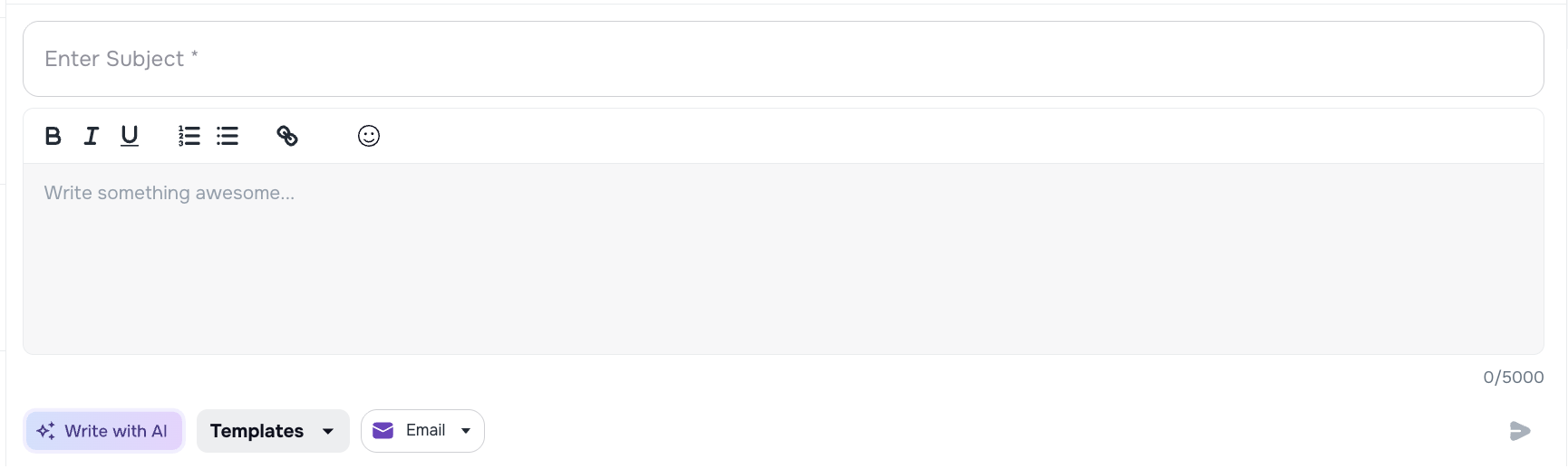
We added support for Message Templates across all Messenger communication channels.
- A new Message Template option is now available directly in the Messenger.
- Templates can be used consistently across In-App, Email, and SMS channels.
- This helps teams respond faster, stay consistent, and reduce manual typing during client communication.
A small change with a big impact on daily workflows. ⚡✉️


📝Law Ruler Integration — Tooltips & Import Validation
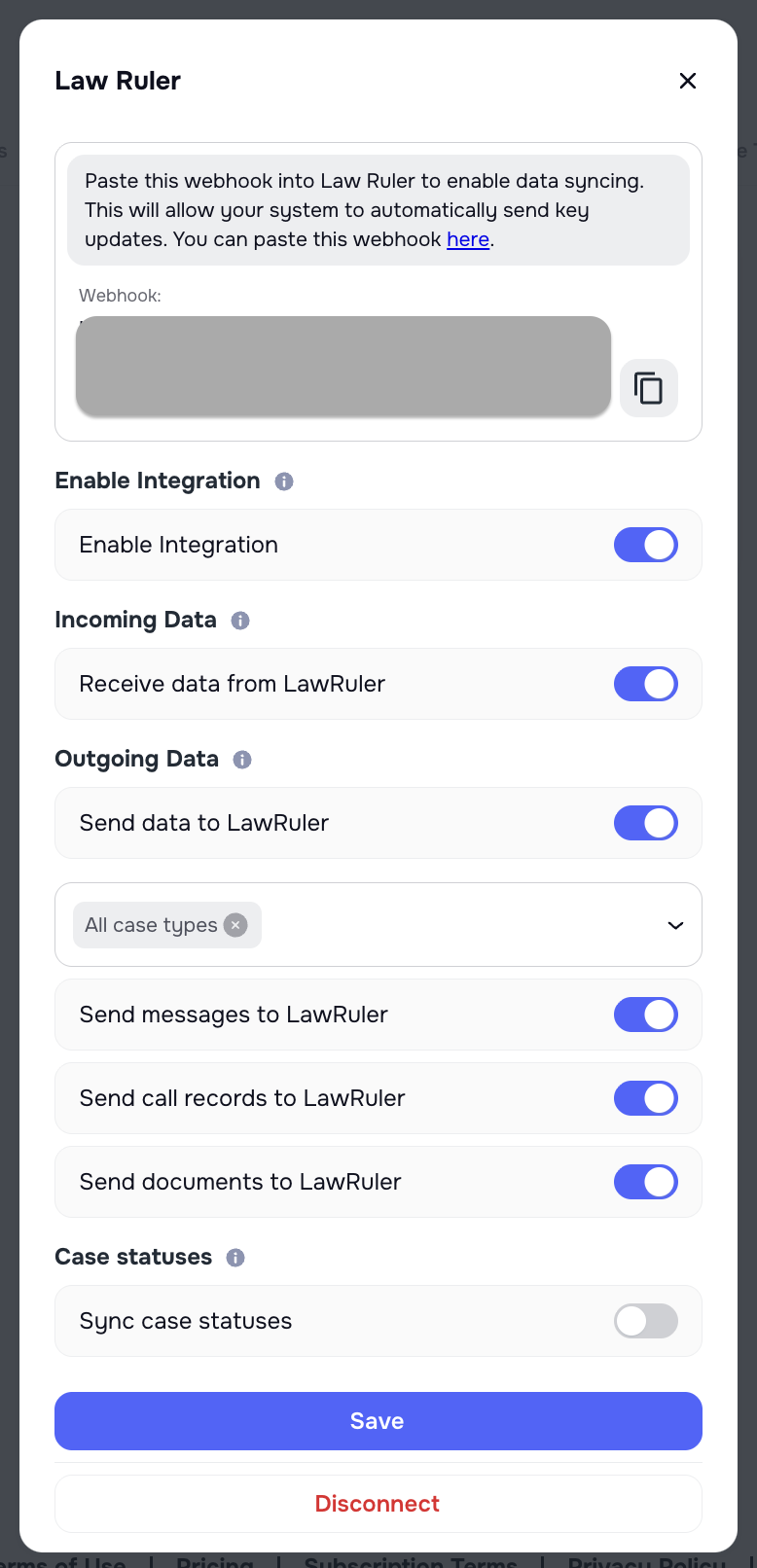
🧭 Helpful tooltips in Law Ruler integration
We added contextual tooltips across the Law Ruler integration to help users better understand how each toggle and section works. These explanations clarify what data is being sent or received, how different switches affect the integration, and reduce confusion during setup.
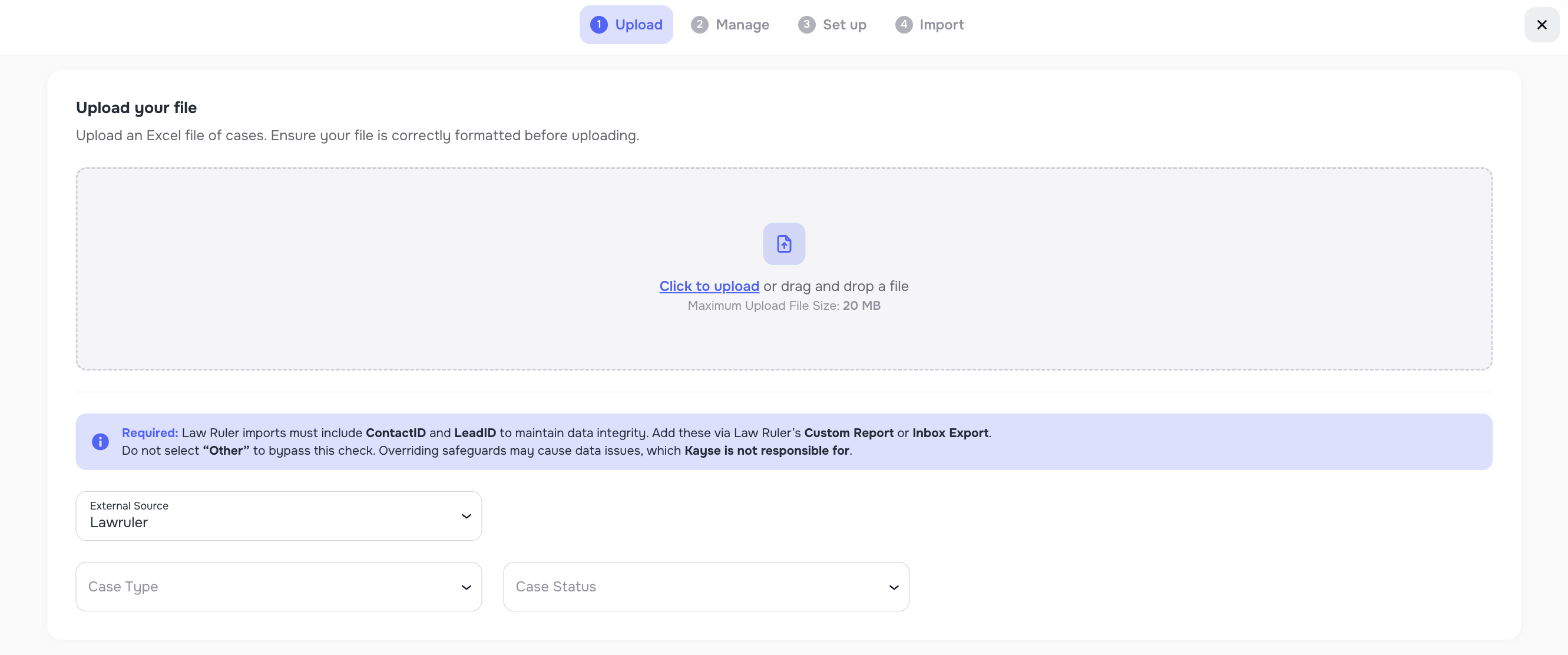
🛡️ Safer Law Ruler imports with file validation
We added a user-friendly validation step in the Importer Wizard for Law Ruler imports. The system now clearly requires Contact ID and Lead ID, explaining why these fields are essential to prevent corrupted data and duplicate records when uploading files from Law Ruler or other external sources.
🛠️ General Optimization & Stability Improvements
Alongside these features, we shipped a series of additional optimizations across the platform.
- Performance and reliability improvements
- UI/UX refinements
All aimed at making the overall experience smoother, faster, and more stable for teams and their clients. 🚀